



Skip to content

Migrating from Jenkins to Azure DevOps

Opinion Articles

Nuno Ribeiro

Bliss Applications

Our experience on trying to simplify and optimize our Continuous Integration and Continuous Delivery (CI/CD) system.

At Bliss Applications, we’ve been using Jenkins as a CI/CD system for some time now. It works. It served its purpose… but it’s time to move on.

This article does not intend to be a Jenkins vs Azure DevOps essay, but more of a “these were our issues and needs, this was the strategy we’ve chosen for our specific case and this was our experience while implementing it”. Which means this is certainly not a golden solution for everyone.

The State of (our) DevOps

Using Jenkins as your main CI/CD solution may give you all the tools you need but may also give you some headaches.

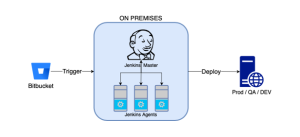
Our past setup relied mostly on a on-premises setup, with a Jenkins instance and its Agents doing all the job. The architecture and workflow was roughly the following:


Looks simple, right? But there were several drawbacks that we identified while using it:

  • You need to dedicate time to updates, system maintenance, plugins management, server maintenance
  • Every setup is still very manual, requiring some level of coding or a bit complex procedure;
  • Most of the times documentation is not clear, especially on community maintained plugins;
  • Coding with Groovy or Pipeline scripts is not very friendly (compared to YAML for instance);
  • You need to have your own backup system (yet another system to maintain or to pay for);
  • Jenkins is not really made for deployments. Yes, there are ways to do it, but there’s a lot to deployments that Jenkins just doesn’t cover;
  • And yes, the interface is known to have frozen somewhere in the early 2010’s.

So, we wanted to find a solution that could reduce the maintenance time, simplify the setup and give us more reliability while still giving us freedom on builds and deployments.

Why Azure DevOps?

  • You already use other Microsoft products and Azure DevOps.
    At Bliss we develop and use a lot of Microsoft based solutions. Most of our backend is .Net and we use Azure as our main cloud solution provider. Also, our Project Managers already use Azure DevOps’ Boards. So Azure DevOps was one of the first solutions we’ve looked into as a natural choice.
  • You can have our own self hosted Agents for builds.
    The option to have self-hosted agents with unlimited build hours makes a big difference on cost control. In most (if not all?) cloud building solutions you pay for build minutes and you easily exceed the free tiers.
    Bitbucket doesn’t have this feature, both Github and Gitlab have a similar feature: runners.
  • The deployment workflow and Agents.
    Another strong reason is the existence of Release Pipelines and Deployment Agents, that really simplify the whole process of deploying.
    Release Pipelines give you more control and visibility over the deployment process specifics.
    Deployment Agents allow you to easily connect to remote machines and execute the actions needed to download artefacts and install your project.
  • You have a vast and diverse number of templates to choose from.
    The provided templates cover the most common use cases and are pretty complete. You’ll find nearly ready Pipelines for Android, iOS, .NET, Javascript, PHP, Golang, and many others.

The Migration

Migrating our pipelines to Azure DevOps was a fairly simple process. On a high level sequence, you start by:

  • creating a project and a new pipeline;
  • choose where your code is hosted (in our case Bitbucket) and a repository;
  • choose a template (or create a custom) pipeline, tweak it and run it.

With just a few tweaks we managed to put them up and running. The documentation is very extensive and provides information about every method we found so far, although it could be a bit more explanatory in some cases.

The Agents

We “refurbished” our Jenkins build agents into Azure self-hosted agents to take advantage of the unlimited build hours. The installation of each agent was a fast process (much more than setting up Jenkins agents). You only need to download the agent into the target machine, copy/paste a couple of provided commands and you’re set.

The Deployment

Deployment Agents have a very similar setup as build agents and simplify a lot the access to remote deployment machines. They are installed on the target machine and automatically sync into a Deployment Pool. You can then target these Agents/Machines in your Release Pipelines.

Release Pipelines is a very cool feature. You need to:

  • choose an Artifact produced from one of your Build Pipelines;
  • setup the release stages and the target machine(s);
  • create the jobs using either the provided templates or custom scripts;
  • check which stages are automatically, scheduled or manually triggered.

Conclusion

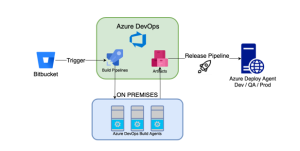
This was the final – not really, always a work in progress 🙂 – architecture for our CI/CD:

At first look it may look more complex than before, but in reality it took a lot of work out of our hands and gave us more control and visibility over every stage of the CI/CD flow.

Overall our experience migrating from Jenkins into Azure DevOps has been very positive so far. It has simplified many aspects of setting up pipelines to build and deploy, it has taken the several periodic maintenance activities hassle off our shoulders, without added cost and increased reliability.

And that’s it, hopefully by sharing our experience, we may provide some insights to others that are still studying alternatives and defining strategies.

Related articles

Opinion Articles
RxRepository: Building a testable, reactive, network data repository using RxSwift (part 1)

In this series we will tackle the problem of optimizing network access to fetch data from the network, a common theme of networked applications. While it is certainly trivial to fetch data from a server in any modern framework or OS, optimizing the frequency of access to the network, in order to save bandwidth, battery, user frustration, amongst other things, is complex. More so if you want to reduce code duplication, ensure testability, and leave something useful (and comprehensible) for the next engineer to use.

Opinion Articles
RxRepository: Building a testable, reactive, network data repository using RxSwift (part 2)

In part 1 of this series we started tackling a common problem of networked applications, that of optimizing resource usage and user experience, by optimizing network access. We typically do that by avoiding expensive resource usage, as in avoid making network calls. This avoidance is not more than a mere compromise on the type of resource we decide to spare. Trade a network call for memory space, by caching network responses. It also comes with constraint relaxation, as we do not need the latest version of a particular resource. We, thus, avoid a network call. Nevertheless we want that what we have cached to eventually expire, or to be able to forcefully reload a resource.